
Custom Content #
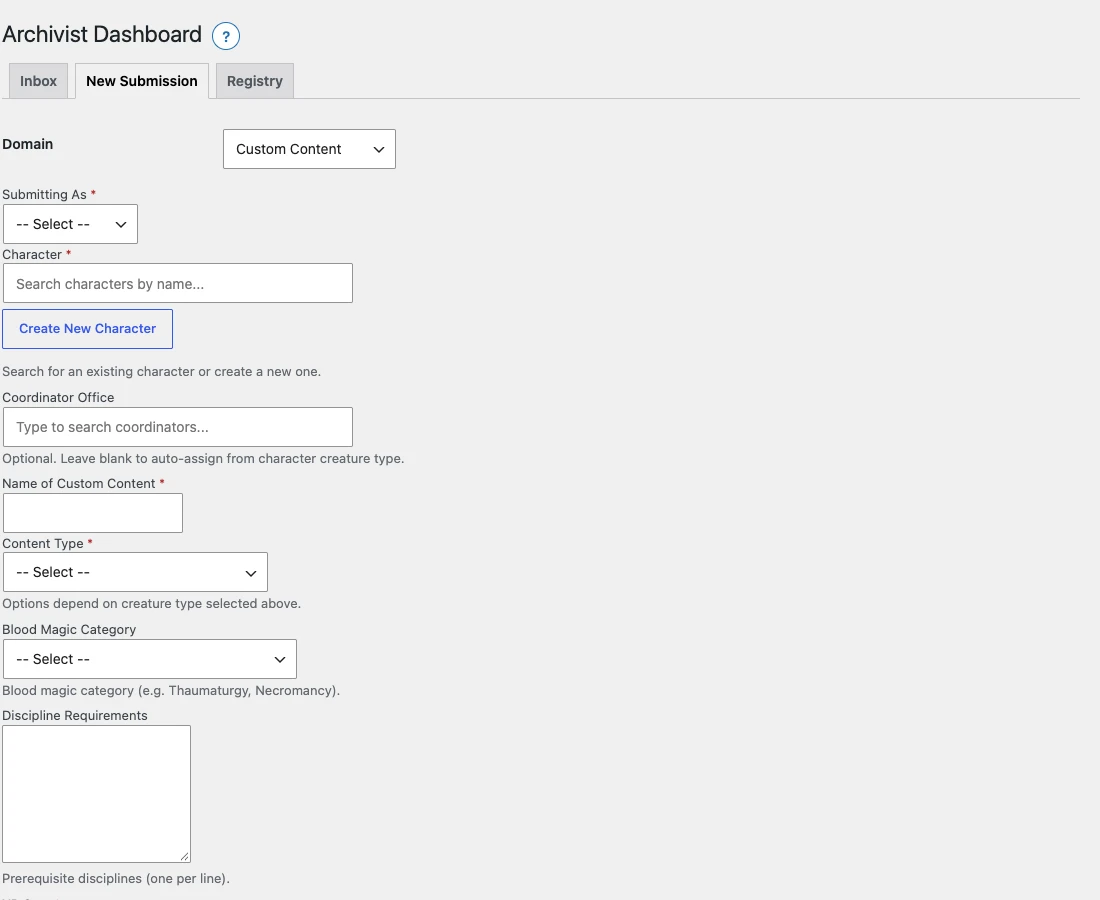
Proposes a new piece of custom content, such as a combination discipline or a ritual, for approval and the ccHub.
Who can use this #
Filed by: Players, staff, Coordinators or the Archivist; Submitting As says which.
How to get there #
On the website: the Archivist Submit page → Domain Custom Content → Form Custom Content. In wp-admin: Archivist → Workspace → New Submission tab.
The screen #
| Field | Required | What to enter |
|---|---|---|
| Submitting As | Yes | Pick one. Choices: As Player, As Staff, As Coordinator, As Archivist. |
| Character | Yes | Search for an existing character or create a new one. |
| Coordinator Office | – | Optional. Leave blank to auto-assign from character creature type. |
| Coordinators Who Must Approve | – | Tick every coordinator whose power, rule or item this uses (for example necromancy: the Giovanni Coordinator). Each one you tick must approve. |
| Name of Custom Content | Yes | Type it in. |
| Content Type | Yes | Options depend on creature type selected above. Choices: Combination Discipline / Technique, Blood Magic: Ritual, Blood Magic: Path, Discipline, Inceptor Discipline, Merit, Path of Enlightenment, Sabbat Ritae, Kuei-jin: Ritual, Fallen Rituals, …. |
| Blood Magic Category | – | Blood magic category (e.g. Thaumaturgy, Necromancy). Choices: Thaumaturgy – Hermetic, Thaumaturgy – Sielanic, Dark Thaumaturgy, Akhu, Assamite Sorcery – Dur-An-Ki, Koldunic Sorcery, Abyssal Mysticism, Natib Athirat, Sadhana, Black Hand Aljusuri, …. |
| Discipline Requirements | – | Prerequisite disciplines (one per line). |
| XP Cost | Yes | A number. |
| MET Rules / Mechanics | Yes | Full mechanical write-up of the custom content. |
| Chronicle Where Content Was Created | Yes | Search for the chronicle. |
| HST Who Approved | Yes | Auto-populated from chronicle selection when possible. |
| Date of Archival | – | A date. |
| Applicable R&U Classifications | – | Select any applicable Regulation & Usage rules. |
The form fills in Submitted By and your email from your account.
Reviewers fill in their own fields on the request's page: Review Comments, Reason for Escalation, Resolution Notes, Resolution.
Where it goes #
Submission → Staff Review (the chronicle's HST) → Coordinator Review (every Coordinator it needs) → Archivist Review. When you are the Coordinator of an office the content belongs to, Staff Review is skipped and it goes straight to Coordinator Review.
Common tasks #
File it #
- Open Submit a Request and pick Custom Content, then Custom Content.
- Fill in the fields above; the form stars the ones marked Yes.
- Click Submit Request and follow it from its page.
Things to know #
- Each Coordinator the content falls under approves it; it shows on the ccHub once the Archivist approves.
Troubleshooting #
- "Submission failed. Please check the form and try again." A required field is empty. Fill in every field marked Yes above.
