
accessSchema Settings #
Where this site looks up members' OWbN roles (HST, Coordinator, exec offices and the rest), which every OWbN plugin uses to decide who can do what.
Who can use this #
Site admins.
How to get there #
wp-admin → OWBN Core → Settings → accessSchema.
The screen #
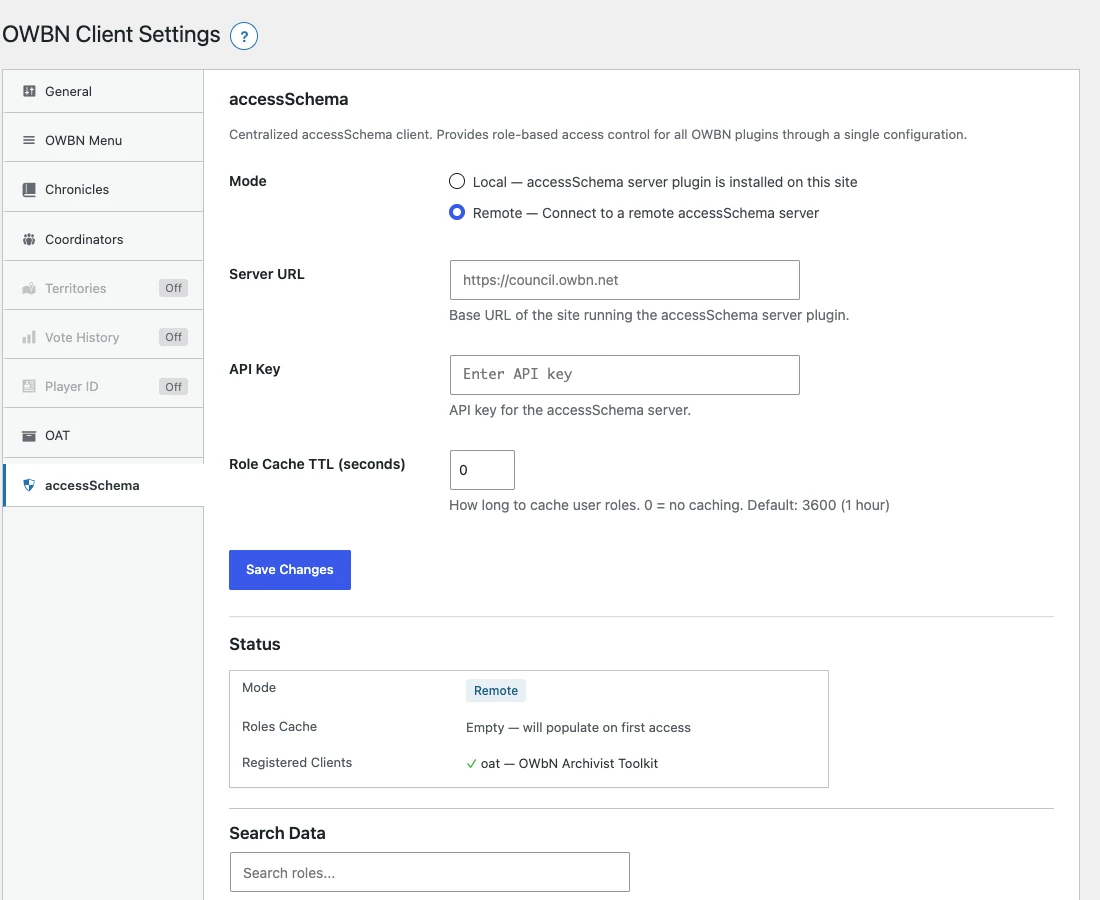
- Mode
- Local — accessSchema server plugin is installed on this site – only the site that runs the role server.
- Remote — Connect to a remote accessSchema server – every other site.
- Server URL and API Key – the role server and its key. The key shows as dots and its last four characters; click in it to type a new one.
- Role Cache TTL (seconds) – how long a member's roles are kept before they are looked up again.
0means no caching; the default is 3600 (an hour). - Status – how many members' roles are cached, and which plugins use the role lookup (Registered Clients).
- Search Data – type to look through the roles this site has cached.
Save Changes saves the tab.
Common tasks #
Pick up a member's new role now #
- Open the member under wp-admin → Users.
- Under AccessSchema Roles, click Refresh Roles.
Things to know #
- Roles change on the role server, never here. This site only keeps a copy for Role Cache TTL seconds.
- A member's roles are looked up when they first need them, so a new role shows within the cache time or after Refresh Roles.
- The role server answers about 60 lookups a minute per site. Refresh members a few at a time, never everyone at once.
Troubleshooting #
- Someone's new role doesn't work yet. Click Refresh Roles on their profile, or wait out Role Cache TTL.
- Nobody's roles load. Check Server URL and API Key against the role server's settings.
