
R&U Request #
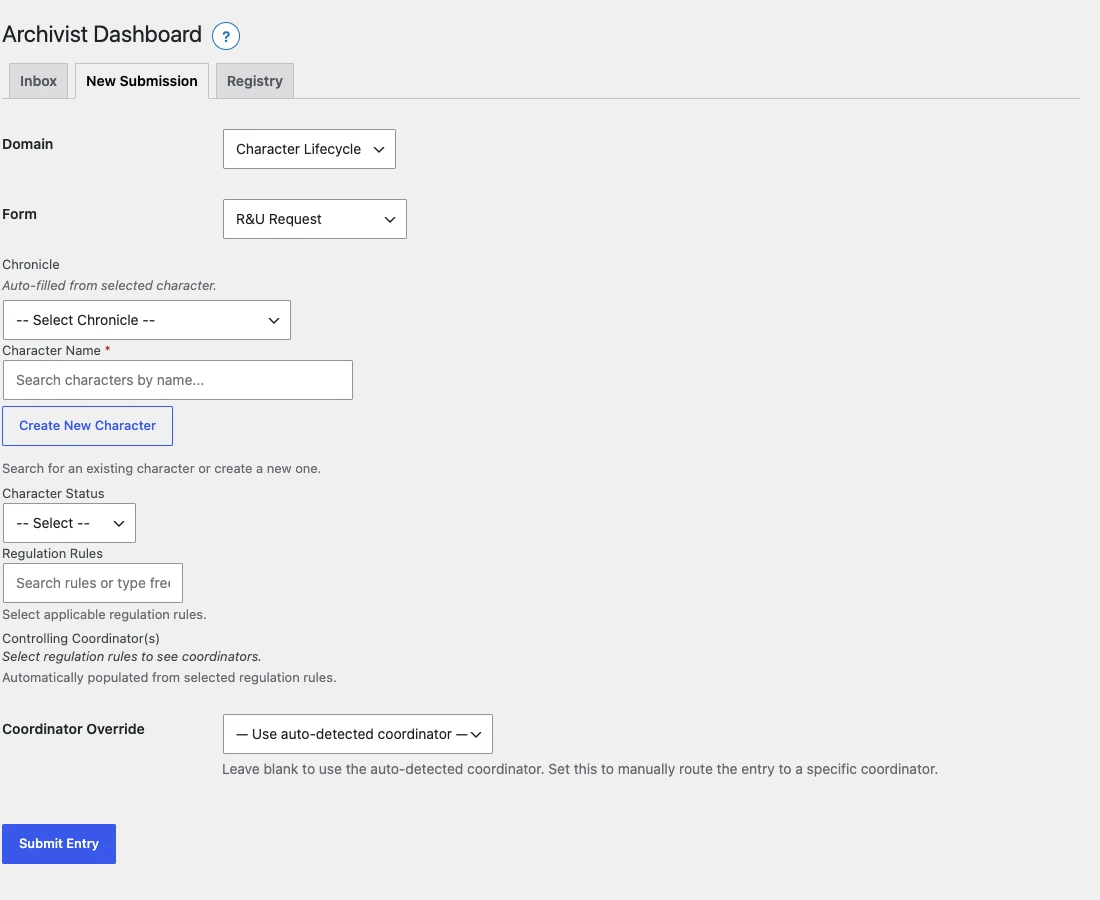
Records a character's regulated items: the Regulation & Usage rules it falls under, and the Coordinators who control them.
Who can use this #
Filed by: Players for their own characters, and staff for their chronicle's.
How to get there #
On the website: the Archivist Submit page → Domain Character Lifecycle → Form R&U Request. In wp-admin: Archivist → Workspace → New Submission tab.
The screen #
| Field | Required | What to enter |
|---|---|---|
| Chronicle | Yes | Search for the chronicle. |
| Character Name | Yes | Search for an existing character or create a new one. |
| Character Status | – | Pick one. Choices: Active, Dead, Inactive, Removed IC, Removed OOC. |
| Regulation Rules | – | Select applicable regulation rules. |
| Controlling Coordinator(s) | – | Automatically populated from selected regulation rules. |
| Add another character | – | Adds a block with its own Character Name, Character Status and Regulation Rules, to file the same kind of request for another character in the same go. Remove drops a block. Up to 10 characters in all. |
| Coordinators Who Must Approve | – | Tick every coordinator whose power, rule or item this uses (for example necromancy: the Giovanni Coordinator). Each one you tick must approve. A rule that doesn't say which coordinator also needs this; with nothing ticked it goes to the character's clan or sect coordinator. |
The form fills in Submitted By and your email from your account.
Reviewers fill in their own fields on the request's page: Review Note, Coordinator Note, Resolution Notes, Resolution Type.
Where it goes #
Submission → Staff Review (the chronicle's HST) → Coordinator Review, when a rule needs a Coordinator → Archivist Review. When you are the Coordinator of an office the request belongs to, Staff Review is skipped and it goes straight to Coordinator Review.
Common tasks #
File several characters in one request #
- Fill in the first character and its rules as usual.
- Click Add another character and fill in the block that appears: the character, its status and its rules. Repeat for each character. Use Remove on a block you don't want.
- Tick Coordinators Who Must Approve once; it applies to every character.
- Click Submit Request. Each rule of each character becomes a line. Lines in the same chronicle with the same approvers open together as one request page; lines for another chronicle, or that go to another coordinator, are filed as their own requests.
File it #
- Open Submit a Request and pick Character Lifecycle, then R&U Request.
- Fill in the fields above; the form stars the ones marked Yes.
- Click Submit Request and follow it from its page.
Things to know #
- Pick every rule the item falls under; Controlling Coordinator(s) fills in from them and decides who reviews it.
- A rule marked Elevated means a Coordinator must act; the request won't approve itself.
- Several characters. Each extra character takes its own chronicle from the character you pick, so one request can cover characters in different chronicles. Each of those lines goes to its own chronicle's HST.
- Several rules, one request page. Each rule you pick becomes its own line: its own request and, once approved, its own entry on the character. Lines that have the same approvers open together on one page, where a reviewer can approve every line at once or veto a single line. A line that goes to a different Coordinator is filed as a separate request.
- Tick every coordinator whose power, rule or item the request uses under Coordinators Who Must Approve; each one must approve before it moves on. A rule that doesn't say which coordinator (such as "Appropriate Coordinator") goes to the character's clan or sect coordinator unless you tick one.
Troubleshooting #
- "Submission failed. Please check the form and try again." A required field is empty. Fill in every field marked Yes above.
