
accessSchema Rules #
Rules that refuse a role when the member already holds one that clashes with it.
Who can use this #
Site admins of sso.owbn.net.
How to get there #
wp-admin on sso.owbn.net → Users → accessSchema Rules (the screen is titled Access Schema Rules).
The screen #
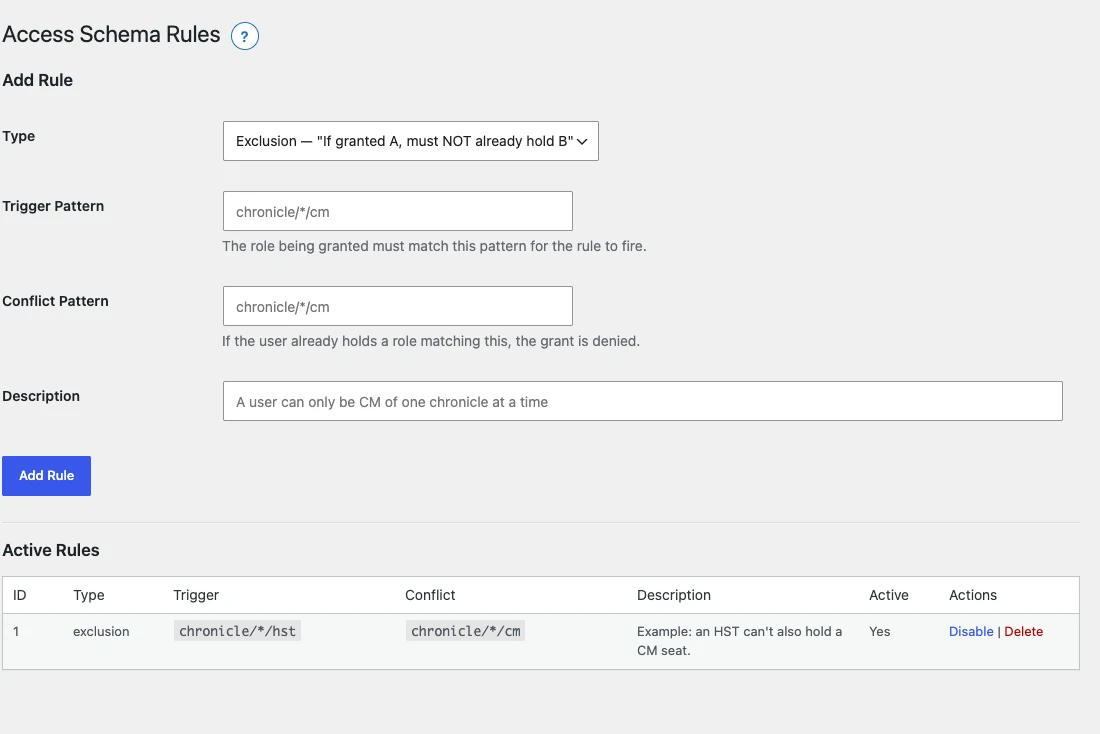
- Add Rule
- Type – Exclusion: if granted A, must not already hold B.
- Trigger Pattern – the role being given. The rule only fires when it matches.
- Conflict Pattern – the role that blocks it. If the member already holds a match, the grant is refused.
- Description – why the rule exists, in plain words.
- Active Rules – each rule's ID, Trigger, Conflict and whether it's Active, with Disable or Enable, and Delete.
Common tasks #
Stop one person holding two clashing seats #
- Under Add Rule, set the Trigger Pattern to the seat being given, such as
coordinator/*/coordinator. - Set the Conflict Pattern to the seat that clashes with it.
- Write the reason in Description and add the rule.
Pause a rule #
- Click Disable next to it. Enable turns it back on.
Things to know #
- Rules are checked only when a role is given, never when one is taken away, and never against roles already held.
- In a pattern,
*stands for any one part and**for any number of parts. - A refused grant from another plugin, such as C&C Manager, gives the person no role; the plugin's record may still list them.
Troubleshooting #
- A grant was refused and it shouldn't have been. Find the rule whose patterns match, and disable it or narrow it.
- A rule never fires. Its Trigger Pattern doesn't match the role being given; check the parts and the wildcards.
