
Users #
What OWBN Core adds to wp-admin's Users list and to each member's profile.
Who can use this #
Site admins, and anyone else who can list users.
How to get there #
wp-admin → Users.
The screen #
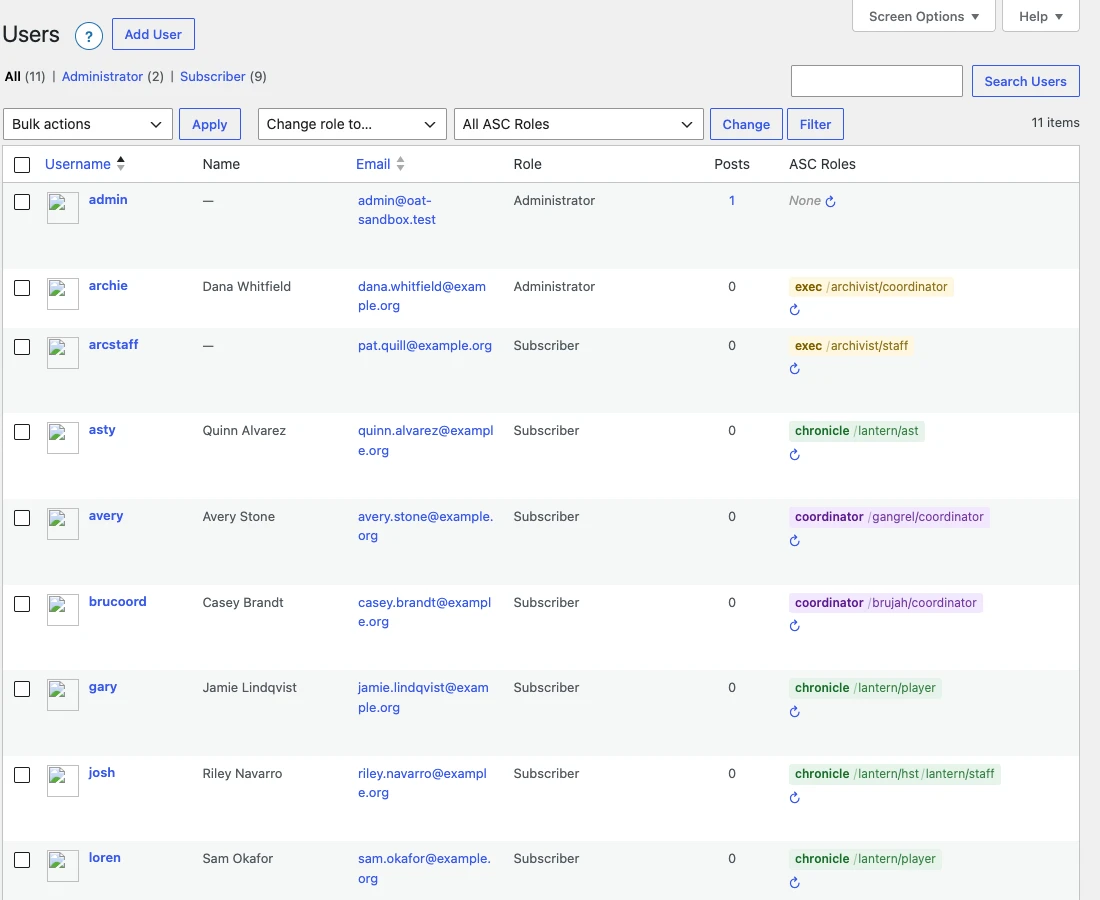
On the list:
- ASC Roles – each member's OWbN roles, from the role cache.
- Player ID – each member's Player ID.
- Filter by ASC role, then Filter – shows only members holding a role; — No ASC Roles — shows those with none. On sso.owbn.net, accessSchema's own role filter takes its place.
- Refresh ASC Roles (bulk action) – looks up the ticked members' roles again.
On a member's profile:
- Player Information → Player ID – see Player ID Settings.
- AccessSchema Roles → Current Roles, and Refresh Roles, which clears that member's cached roles and fetches them again.
Common tasks #
Pick up roles that changed today #
- Tick the members.
- Choose Refresh ASC Roles and click Apply.
Things to know #
- Refresh ASC Roles handles at most 25 members at a time; the notice says how many were left. The role server answers about 60 lookups a minute per site.
- Roles are changed on the role server, never here.
Troubleshooting #
- "N more were not refreshed: refresh at most 25 users at a time." Run it again on the members left, a minute later.
