
Domains #
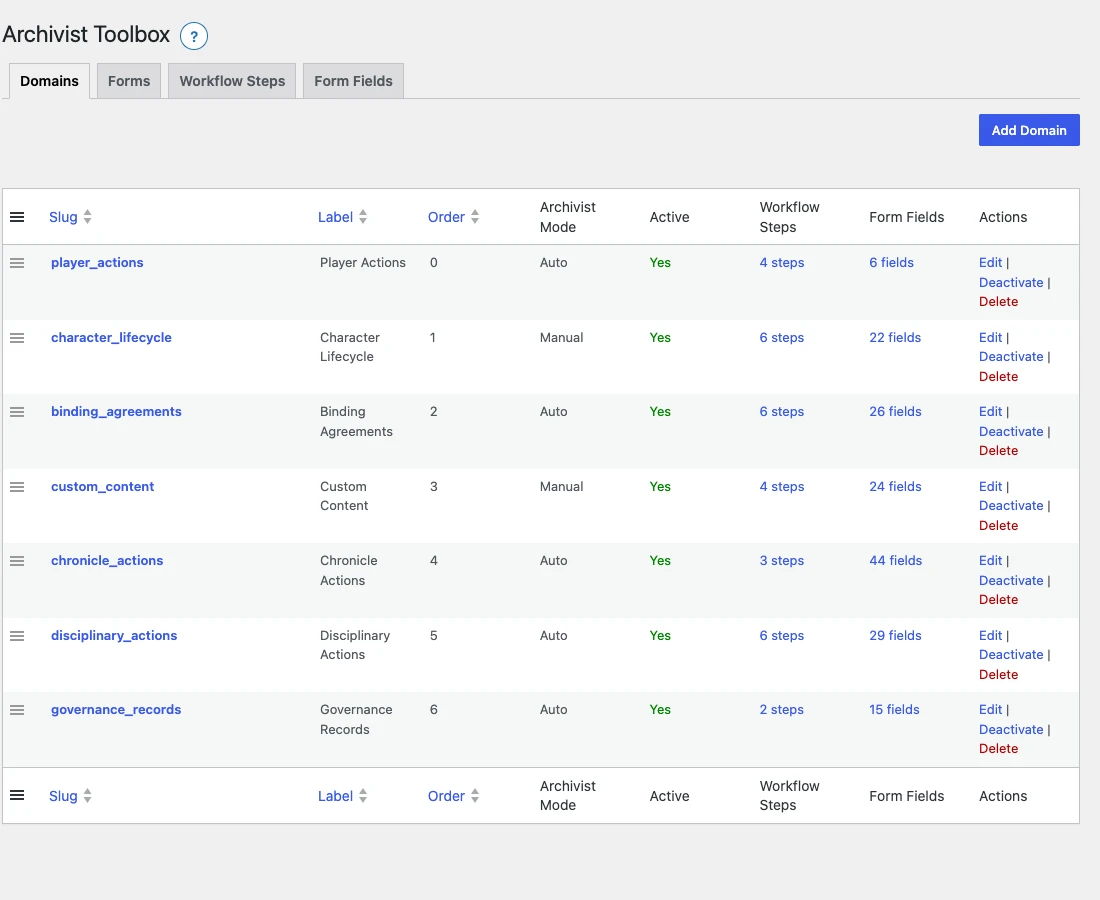
The kinds of request OAT handles: Character Lifecycle, Custom Content, Chronicle Actions, Binding Agreements, Disciplinary Actions, Governance Records and Player Actions.
Who can use this #
Site admins on the Archivist site.
How to get there #
On archivist.owbn.net, wp-admin → Archivist → Toolbox → Domains.
The screen #
- The list – Slug, Label, Order, Archivist Mode, Active, and links to the domain's Workflow Steps and Form Fields. Drag a row by its handle to reorder.
- The edit form:
- Label – the name members see in the Domain list on Submit a Request.
- Slug – the domain's key; workflow steps and forms refer to it.
- Active – an inactive domain drops out of the Domain list.
- Sort Order – lower numbers come first; equal numbers sort by name.
- Archivist Mode – Auto logs a request on the Timeline when its last step approves it; Manual leaves logging to the Archivist's Log button.
- Assigned Forms – the forms filed under this domain.
- Quick Links – Manage Workflow Steps, Fields and Create a form.
- Add Domain or Update Domain – saves.
Common tasks #
Rename a domain #
- Click the domain, change Label, and click Update Domain. Leave Slug alone: steps and forms use it.
Take a domain out of use #
- Untick Active and click Update Domain. Its requests stay where they are.
Things to know #
- Changing a slug breaks every workflow step and form that names the old one.
Troubleshooting #
- A domain is missing from Submit a Request. It is inactive, or it has no active form.
