
Player Actions #
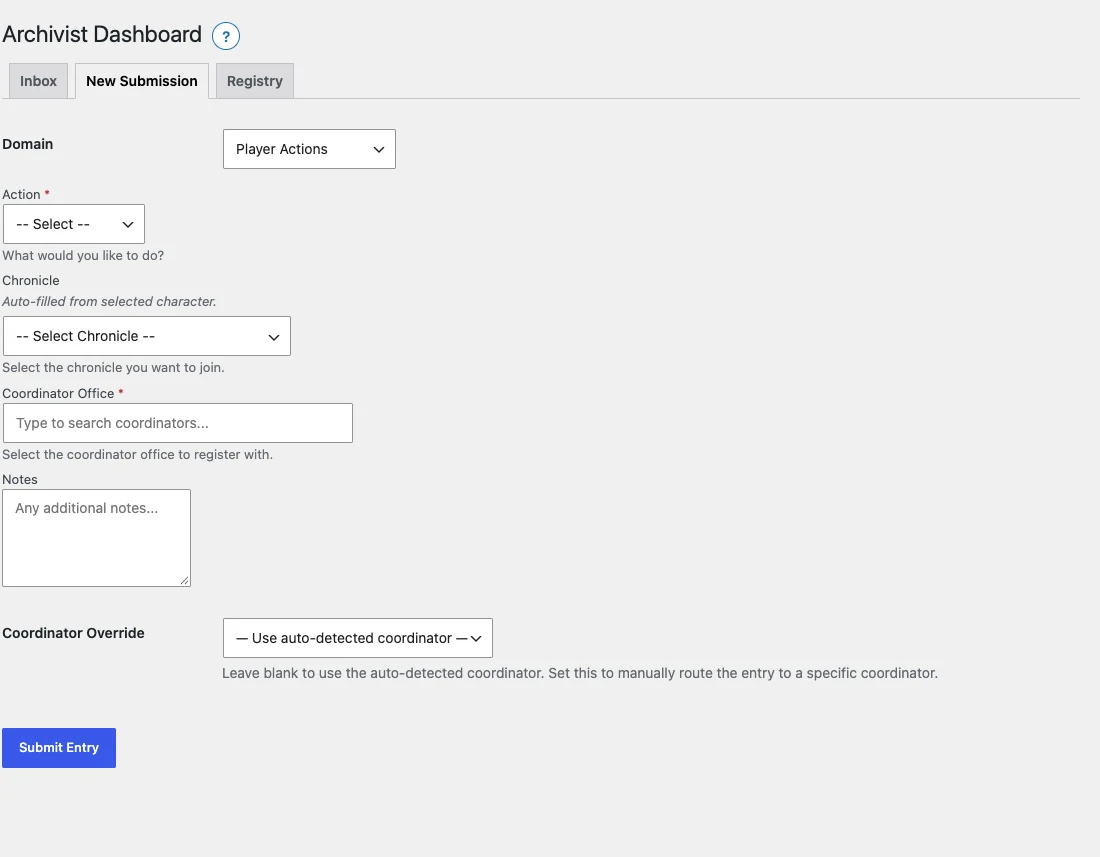
Asks to join a chronicle, or to register with a Coordinator office.
Who can use this #
Filed by: Any player.
How to get there #
On the website: the Archivist Submit page → Domain Player Actions → Form Player Actions. In wp-admin: Archivist → Workspace → New Submission tab.
The screen #
| Field | Required | What to enter |
|---|---|---|
| Action | Yes | What would you like to do? Choices: Join a Chronicle, Genre Register. |
| Chronicle | Yes | Select the chronicle you want to join. |
| Coordinator Office | Yes | Select the coordinator office to register with. |
| Notes | – | Type it in. |
The form fills in Submitted By and your email from your account.
Where it goes #
Submission → Staff Review (the chronicle's HST or CM) → Coordinator Review, for registering with a Coordinator office → Archivist Review.
Common tasks #
File it #
- Open Submit a Request and pick Player Actions, then Player Actions.
- Fill in the fields above; the form stars the ones marked Yes.
- Click Submit Request and follow it from its page.
Things to know #
- The chronicle's HST or CM reviews it first.
Troubleshooting #
- "Submission failed. Please check the form and try again." A required field is empty. Fill in every field marked Yes above.
