
All Votes #
Every vote on the site, in any stage, with its type, stage and number of ballots.
Who can use this #
Site admins and the Web team.
How to get there #
wp-admin on council.owbn.net → WP Voting → All Votes.
The screen #
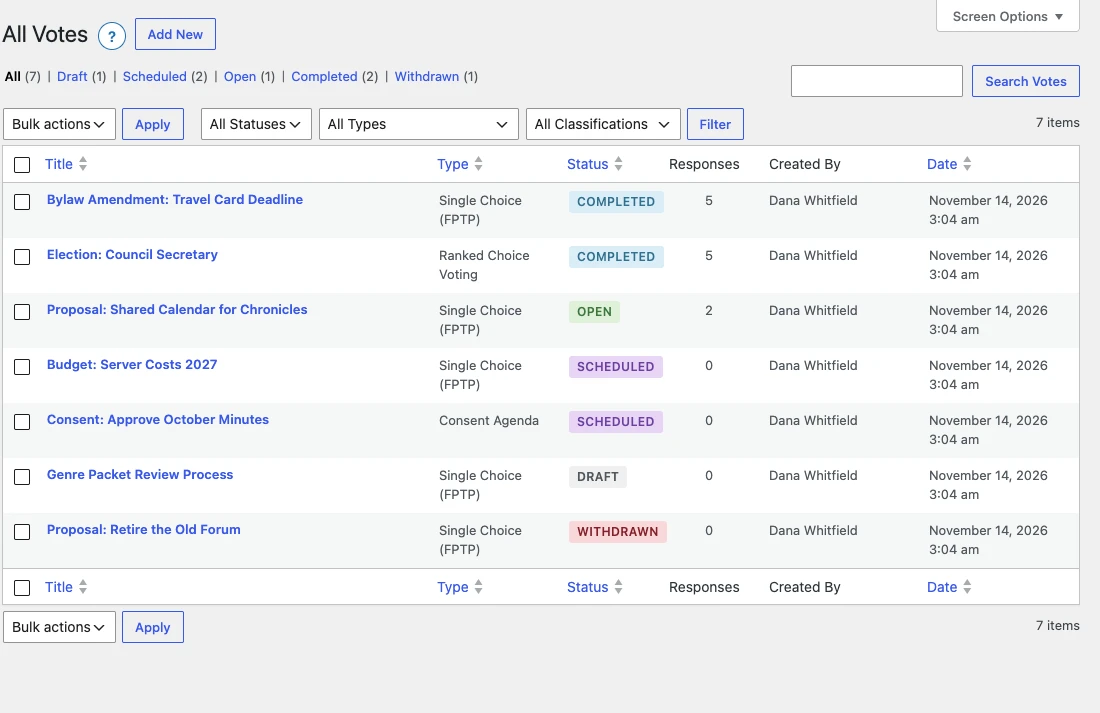
- Add New next to the title starts a vote, see Creating and Editing a Vote.
- All, Draft, Scheduled and the other stages above the list show the votes in that stage.
- All Statuses, All Types and All Classifications, then Filter, narrow the list; Clear Filters undoes them. Search Votes looks in titles and descriptions.
- One row per vote: Title, Type, Status, Responses (ballots cast), Created By and Date.
- Under each title:
- Edit – opens the vote.
- View – the vote's public page, in a new tab.
- Results – its result page, once it has closed.
- Delete – removes the vote, its ballots and its result for good.
- Bulk actions: Delete, Set Open and Set Closed for the votes you tick.
Stages #
- Draft – only admins see it, and it never opens on its own.
- Scheduled – voters see it with its opening date; it opens on that date. A consent agenda item already takes objections.
- Open – taking ballots.
- Closed – voting is over and the result is being counted.
- Completed – the result is in.
- Withdrawn – pulled before it finished. Ballots already cast stay.
- Archived – kept, but out of the way.
Common tasks #
Find a vote #
- Pick a stage under All Statuses, a type under All Types or a classification under All Classifications, or type part of its title in Search Votes.
- Click Filter or Search Votes.
List the votes of no confidence #
- Under All Classifications, pick Vote of No Confidence.
- Click Filter.
To list them on a page, give the [wpvp_votes] shortcode a classification attribute, or fill in Classification on Elementor's Vote List widget. Several classifications go in separated by commas.
Pull a vote #
- Click Edit under the vote.
- Set Status to Withdrawn and click Update.
Things to know #
- Votes open, close and get counted on their own: a job checks every hour, and again at midnight.
- Delete can't be undone, and the vote disappears from every chronicle's and coordinator's vote history. To take a vote down, withdraw or archive it instead.
- Set Open on a vote whose opening date is still ahead leaves it Scheduled until that date.
- A vote can carry several classifications. Filtering by one shows every vote that has it among the others.
Troubleshooting #
- A vote didn't open or close on time. The hourly job hasn't run yet. If it's more than an hour late, the site's scheduled jobs aren't running; ask the Web team.
- A closed vote has no result. The next run counts it. A site admin can count it now from Settings → Advanced → Process All Closed Votes.
