
Archivist Inbox #
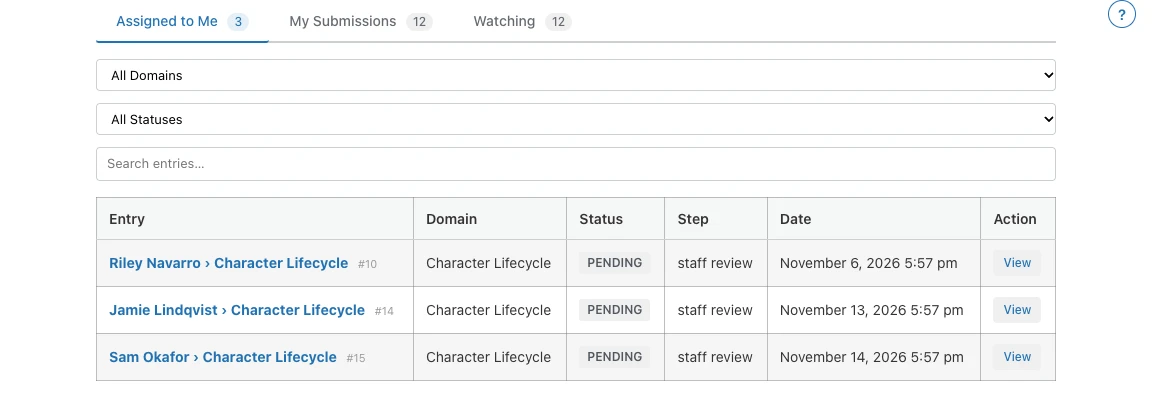
Your requests in one list: the ones waiting on you, the ones you filed, and the ones you are watching.
Who can use this #
Anyone signed in.
How to get there #
- On the website: the Archivist Inbox page, or View Inbox on the Archivist Dashboard.
- In wp-admin: Archivist → Workspace → Inbox tab.
The screen #
- The tabs:
- Assigned to Me – requests at a step you have, by name or by role. This is your work.
- My Submissions – the last 20 requests you filed, wherever they are.
- Watching – requests you follow with Watch.
- All Domains and All Statuses – narrow the list to one domain or one status.
- Search entries… – narrows the list as you type.
- The table – Entry (who filed it, the domain and the number), Domain, Step, Status, Date and View, which opens A Request's Page.
- In wp-admin, the Workspace's Inbox tab shows the same requests as three lists, one under the other: those waiting on you, Watched Entries and My Entries, with a domain filter on top.
Common tasks #
Work through what is waiting on you #
- Open Assigned to Me.
- Click View on a request, act on it, and come back for the next.
Check on a request you filed #
- Open My Submissions and find it; Step and Status show where it stands.
Things to know #
- You get an email when a request reaches your step, and when a request you watch moves on or finishes. Choose one email a day instead on the Archivist Dashboard.
- A request you file shows under My Submissions at once.
- For the Archivist, Assigned to Me holds every open request, at any step.
- Watching a request puts it under Watching; click Watching on its page to stop.
Troubleshooting #
- "Please log in to access your inbox." Sign in first.
- "No entries found." Nothing in this tab yet.
- "No entries match your filters." Set the filters back to All Domains and All Statuses, and clear the search.
- A request I should review isn't under Assigned to Me. It isn't at your step yet, or your account doesn't hold the role the step needs. Its page's Assignees shows who has it.
