
Account Sync #
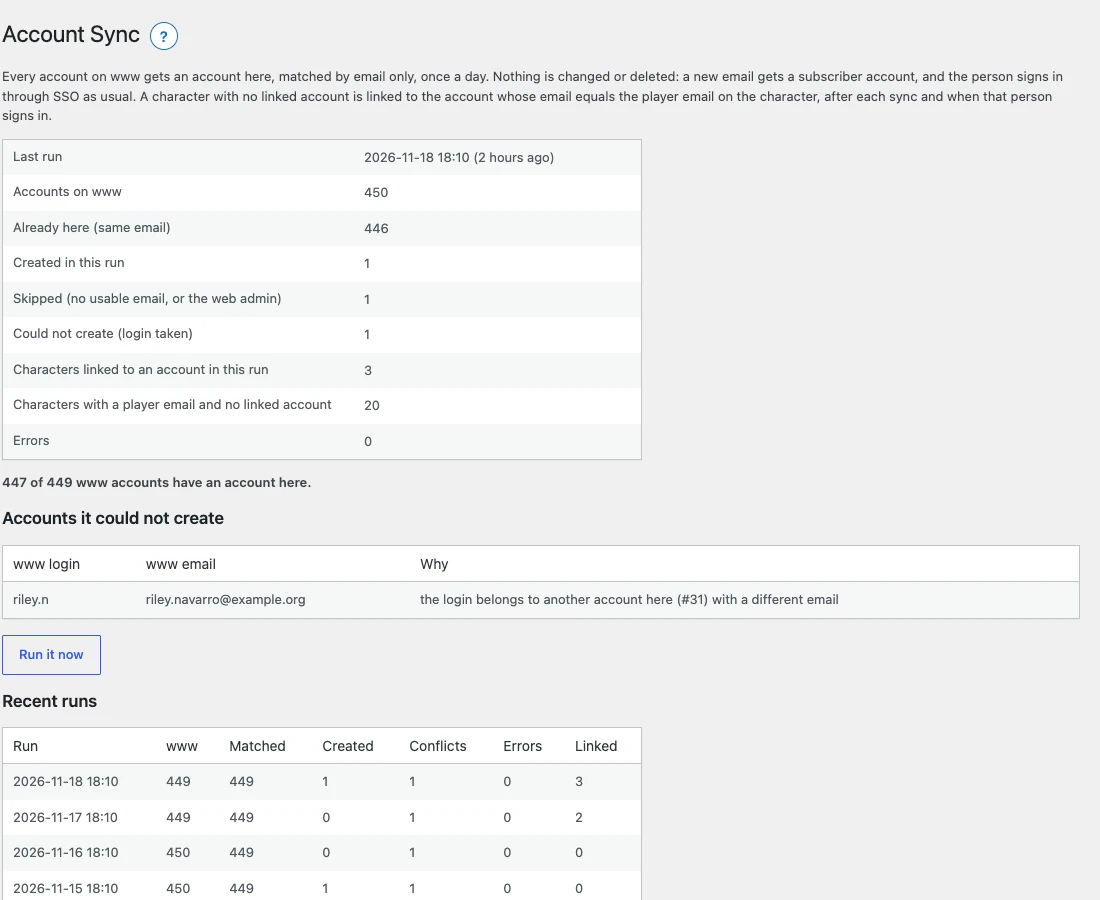
Gives every account on www an account on the Archivist site, once a day, so a role holder who has never signed in here can still be assigned a request.
Who can use this #
Site admins on the Archivist site.
How to get there #
On archivist.owbn.net, wp-admin → Archivist → Account Sync.
The screen #
- Last run – when the sync last ran.
- Accounts on www – how many accounts www has.
- Already here (same email) – www accounts whose email already belongs to an account on this site.
- Created in this run – the new accounts made this time.
- Skipped (no usable email, or the web admin) – the web admin account, and any account with no usable email.
- Could not create (login taken) – a www account with a new email whose login already belongs to another account here. Each one is listed under the table with the account that holds the login.
- Characters linked to an account in this run – characters with no linked account that were linked this time, because the player email on the character equals an account's email.
- Characters with a player email and no linked account – characters still waiting. Their email belongs to no account here yet, or to two.
- Errors – accounts that failed to save.
- Run it now runs the sync at once.
- Recent runs – the last runs, newest first, with how many characters each one linked.
Common tasks #
Check that every account is covered #
- Open Account Sync.
- Read the line under the table: it says how many www accounts have an account here. Any that are missing are in the list under Accounts it could not create.
Run the sync now #
- Click Run it now. A person added on www this morning has an account here when it finishes.
Clear a login conflict #
- Find the account that holds the login; the list names it.
- If it is the same person, change that account's email to the one on www, in wp-admin → Users. The next run finds the match.
- If it is a different person, the login has to change on www. Ask the Web team.
Things to know #
- Accounts match by email only, never by login or player ID.
- The sync only adds accounts. It never changes or deletes one that exists.
- A new account has a random password and the Subscriber role. The person signs in through SSO as usual, and nobody is emailed.
- Characters link by email only. A character with no linked account is linked to the account whose email equals the player email on the character: after each sync, when an account is made, and when that person signs in. A blank player email, an email no account holds, an email two accounts hold, and the web admin's email are left alone, and a character already linked to someone stays theirs. The Player Email on the record is never changed.
- A request can only be assigned to a role holder who has an account here. This is what gives them one.
Troubleshooting #
- "The www account source is not set". This site has no address or key for www. Ask the Web team.
- A warning at the top of Archivist pages: "The daily account sync from www has not succeeded lately". The last run failed, or none has worked in 36 hours. Open Account Sync; the last run shows the reason. If it names www or the key, ask the Web team.
- A person is on www but has no account here. Click Run it now, then look under Accounts it could not create.
- A player cannot open their character. Open the Character Record. If the Player Email is blank or is not the email on their account, correct it there, or have them sign in with the account that holds that email. The link is made at their next sign-in or the next sync.
