
Chronicle Staff Report #
Every chronicle's HST and CM, checked against who holds each chronicle's CM role in AccessSchema, so the two can be put right.
Who can use this #
Site admins.
How to get there #
wp-admin → Reports → Chronicle Staff.
The screen #
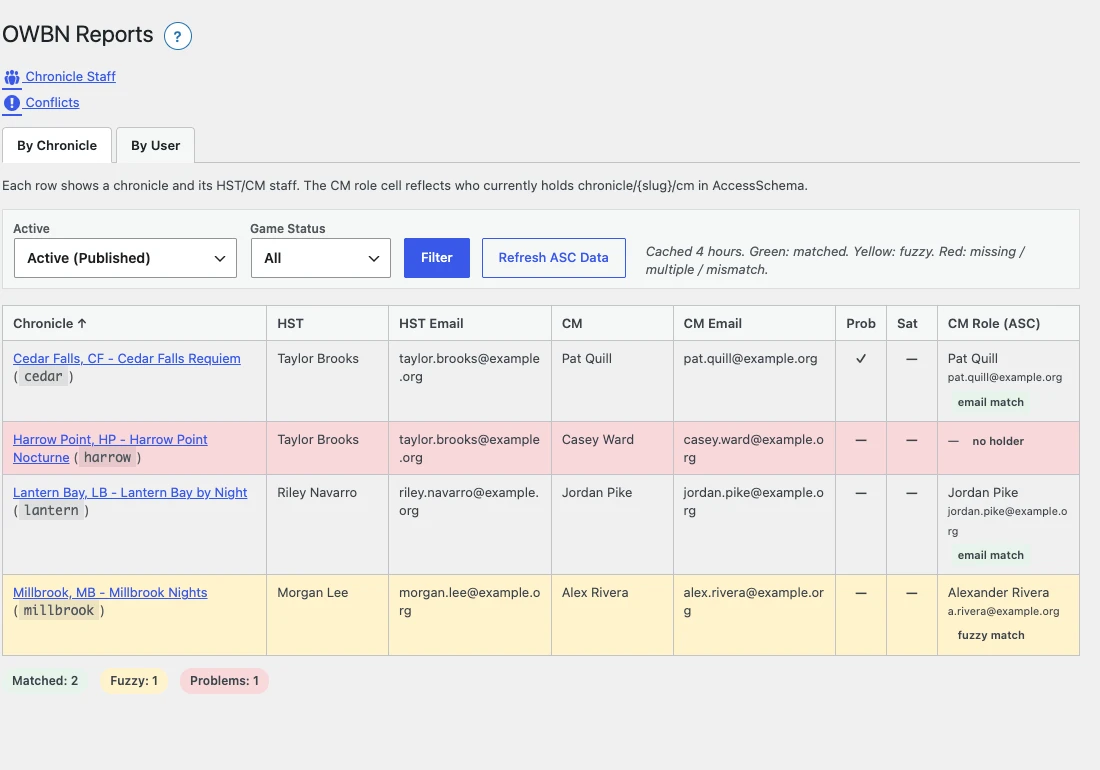
Two views, By Chronicle and By User.
By Chronicle, one row per chronicle:
- Filters: Active, Inactive (Decommissioned) or All; Game Status Full, Probationary or Satellite. Filter applies them.
- Chronicle, HST, HST Email, CM, CM Email, Prob and Sat.
- CM Role (ASC) – who holds
chronicle/<slug>/cmin AccessSchema. A satellite shows its parent's CM, marked "(from parent: …)". - Colour: green when the chronicle's CM and the role holder match, yellow for a close name match, red when the role is missing, held by more than one person, or held by someone else.
- Confirm as CM (on rows that aren't green) – makes that role holder the chronicle's CM and gives them the role.
- Bulk: Confirm match or Ignore (dismiss) the rows you tick.
- Confirm as CM and the bulk actions work on chronicles.owbn.net, where the chronicle records are kept.
- Counts at the foot: Matched, Fuzzy, Problems and Ignored.
- Refresh ASC Data – fetches the role holders again; they are otherwise kept for four hours.
By User, one row per person holding any chronicle/<slug>/cm role, with each role as a tag and its status: whether it matches the chronicle's CM. Bulk: Confirm match, Revoke ASC role or Ignore (dismiss).
Common tasks #
Fix a chronicle whose CM doesn't match #
- Find the red or yellow row.
- If the role holder is the right CM, click Confirm as CM on chronicles.owbn.net.
- If the role holder is wrong, switch to By User, tick their tag for that chronicle and choose Revoke ASC role.
Things to know #
- Revoke ASC role takes the role away in AccessSchema at once, and this page can't undo it. Re-grant it in AccessSchema if needed.
- Ignore (dismiss) only hides a row from this report; nothing changes.
- The report lists staff email addresses, so only site admins can open it.
Troubleshooting #
- "owbn-core client API not available on this site." The site has no chronicle data; turn Chronicles on under General.
- No Confirm as CM button or bulk actions, or "Chronicle not found." Use the report on chronicles.owbn.net, where the chronicle records are kept.
