
Required Plugins #
The plugins the theme needs, and the ones it suggests, installed from one screen.
Who can use this #
Site admins.
How to get there #
wp-admin → Appearance → Install Plugins (the screen is titled Install Required Plugins). A notice at the top of wp-admin also links here while something is missing.
The screen #
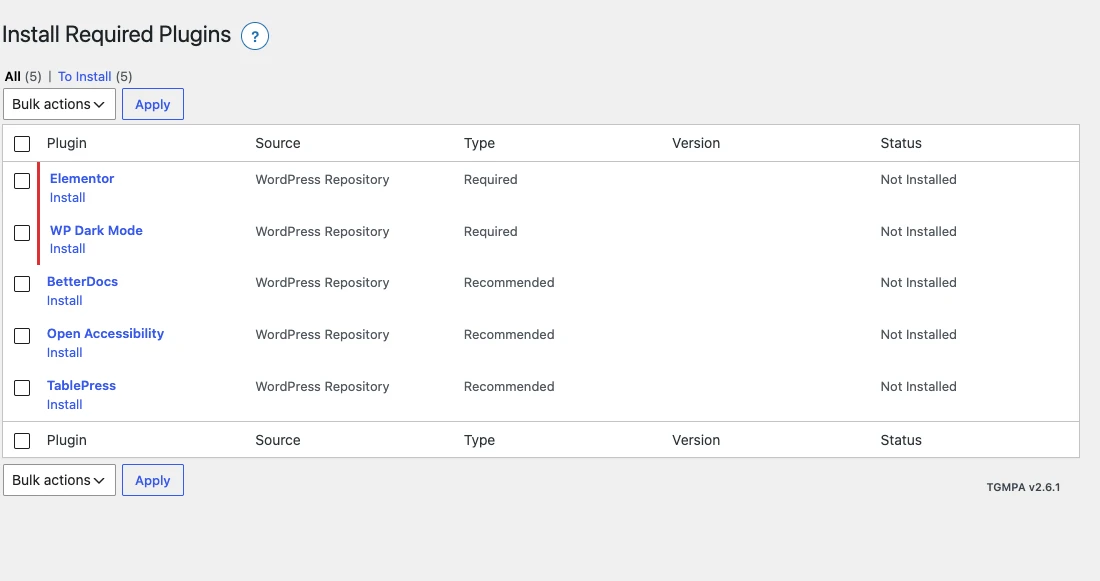
- Required: Elementor and WP Dark Mode.
- Recommended: BetterDocs, TablePress and Open Accessibility.
- Each plugin shows its Source, Type, Version and Status, with Install or Activate under its name.
- Elementor Pro is required too, but it isn't in the WordPress plugin directory, so it isn't on this list. While it's missing, a notice here, on the Dashboard and on Plugins says how to add it.
Common tasks #
Set up a new site #
- Go to Appearance → Install Plugins.
- Install and activate Elementor and WP Dark Mode.
- Upload Elementor Pro's zip from Plugins → Add New → Upload Plugin, activate it, and enter its licence.
- Add the recommended ones the site needs: BetterDocs for a help site, TablePress for tables.
Things to know #
- The theme works without them, but the header, footer and dark mode need Elementor, Elementor Pro and WP Dark Mode.
- Elementor Pro needs its licence entered on the site before its templates show.
- WP Dark Mode's two parts have to stay on the same version, or the site breaks.
Troubleshooting #
- "WP Eternal Theme needs Elementor Pro…" Upload its zip from Plugins → Add New → Upload Plugin and activate it, or activate it if it's already installed.
- The notice keeps coming back. A required plugin is still inactive. Activate it, or dismiss the notice.
