
Chronicle Report #
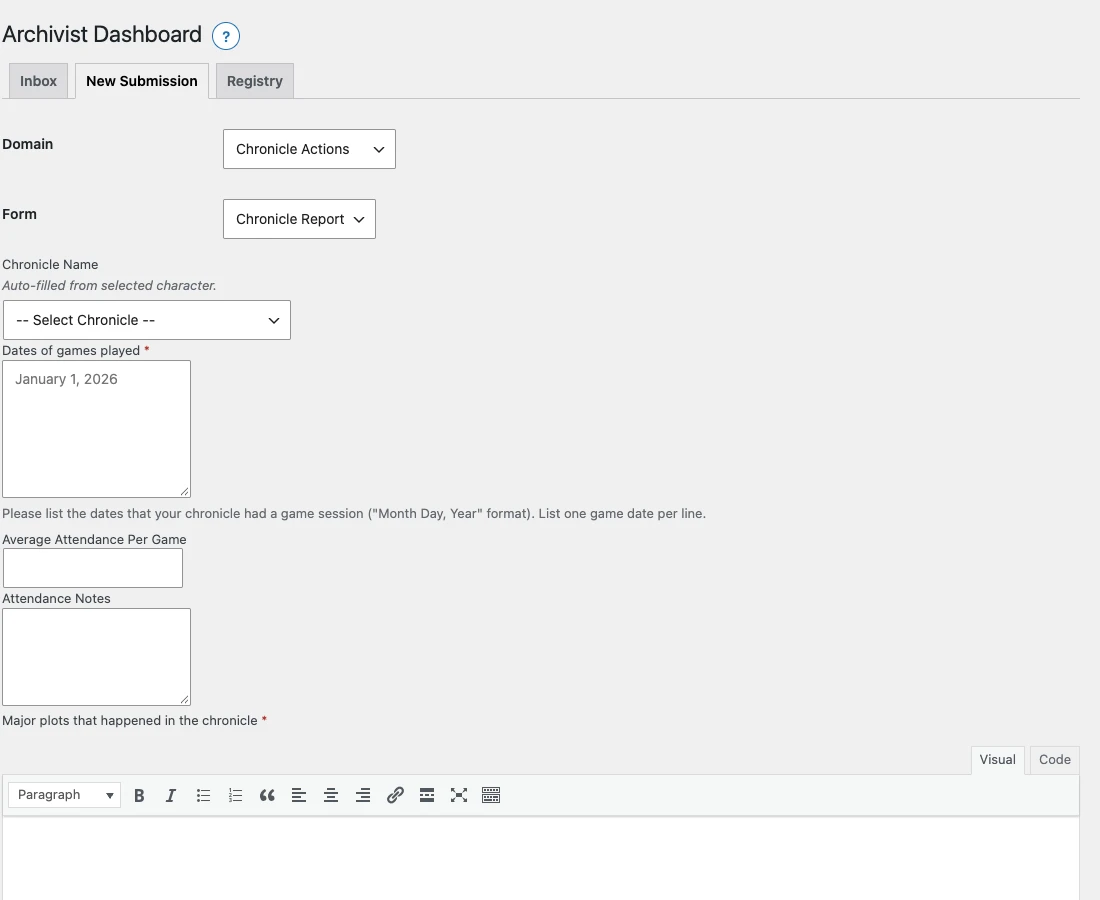
A chronicle's report to OWbN: its game dates, major plots, deaths, political changes, breaches of the Masquerade, attention, and which Coordinators to tell.
Who can use this #
Filed by: Usually the chronicle's HST or CM.
How to get there #
On the website: the Archivist Submit page → Domain Chronicle Actions → Form Chronicle Report. In wp-admin: Archivist → Workspace → New Submission tab.
The screen #
| Field | Required | What to enter |
|---|---|---|
| Chronicle Name | Yes | Search for the chronicle. |
| Dates of games played | Yes | Please list the dates that your chronicle had a game session ("Month Day, Year" format). List one game date per line. |
| Average Attendance Per Game | – | A number. |
| Attendance Notes | – | Type it in. |
| Major plots that happened in the chronicle | Yes | Major plots are defined as plot that affected several players over more than two game sessions. |
| In-character (IC) events that may affect other chronicles or territory | Yes | These are events that could impact in another member chronicle or coord/neutral territory in a meaningful way. |
| In-character events that may gain Regional or National attention | – | Regional attention means events that may or have caused PCs, NPCs or mortal authorities in other regional games or nearby areas to take notice. National attention means events that may or have caused PCs, NPCs or mortal authorities outside of your region to take notice. |
| Major Political Changes within the Chronicle | Yes | Major political changes are defined as changes in important positions, ranks, leadership or other noticeable meaningful power shift (i.e. Princes, Harpies, Bishops, high ranked Garou, Chantry leaders, etc), preferably indicating the names being replaced. |
| Noticeable Masquerade/Veil breaches | Yes | Defined as any breach of the masquerade that reached news, especially online news. |
| Fame x5 level actions | Yes | Defined as actions that would be noticed by the population. |
| Plots that may require help or attention from Coordinators | Yes | Any plot the chronicle feel would benefit from such attention, serving as indication of willingness to work with said coordinator. |
| Notify Coordinators | – | Select any Coordinators this report should be sent to. When the report is approved, each selected Coordinator is emailed the relevant details. |
| Death or Administrative Removal of Prominent Characters within the Chronicle | Yes | Character deaths, NPC (Significant sect members, i.e Prince, Primogen, Archbishop, High Ranked Garou, etc or Kine, Mayor, Media personality or other significant person) or PC. |
| Other Matters the Reporter Feels are Relevant | – | Formatted text. |
| Staff Members | – | Formatted text. |
| Strange and Unusual Events | – | Formatted text. |
| Inter-Chronicle Interactions | – | Formatted text. |
| Disciplinary Actions Handed Out | – | Formatted text. |
| Removal of Disciplinary Actions | – | Formatted text. |
| Change of R&U Character(s) Status | – | Formatted text. |
The form fills in Submitted By and your email from your account.
Reviewers fill in their own fields on the request's page: Review Comments, Escalation Reason, Resolution Notes, Resolution Type.
Where it goes #
Submission → Membership Review, for creating, decommissioning or changing a chronicle's standing → Archivist Review.
Common tasks #
File it #
- Open Submit a Request and pick Chronicle Actions, then Chronicle Report.
- Fill in the fields above; the form stars the ones marked Yes.
- Click Submit Request and follow it from its page.
Things to know #
- The Coordinators you tick get the report by email once the Archivist approves it, and you get a confirmation.
- Its progress shows under Chronicle Reports and Pending Reports on Reports.
Troubleshooting #
- "Submission failed. Please check the form and try again." A required field is empty. Fill in every field marked Yes above.
