
accessSchema Settings #
The keys other OWbN sites use to read and change roles, the audit log, and the cache.
Who can use this #
Site admins of sso.owbn.net.
How to get there #
wp-admin on sso.owbn.net → Settings → Access Schema (the screen is titled Access Schema Settings).
The screen #
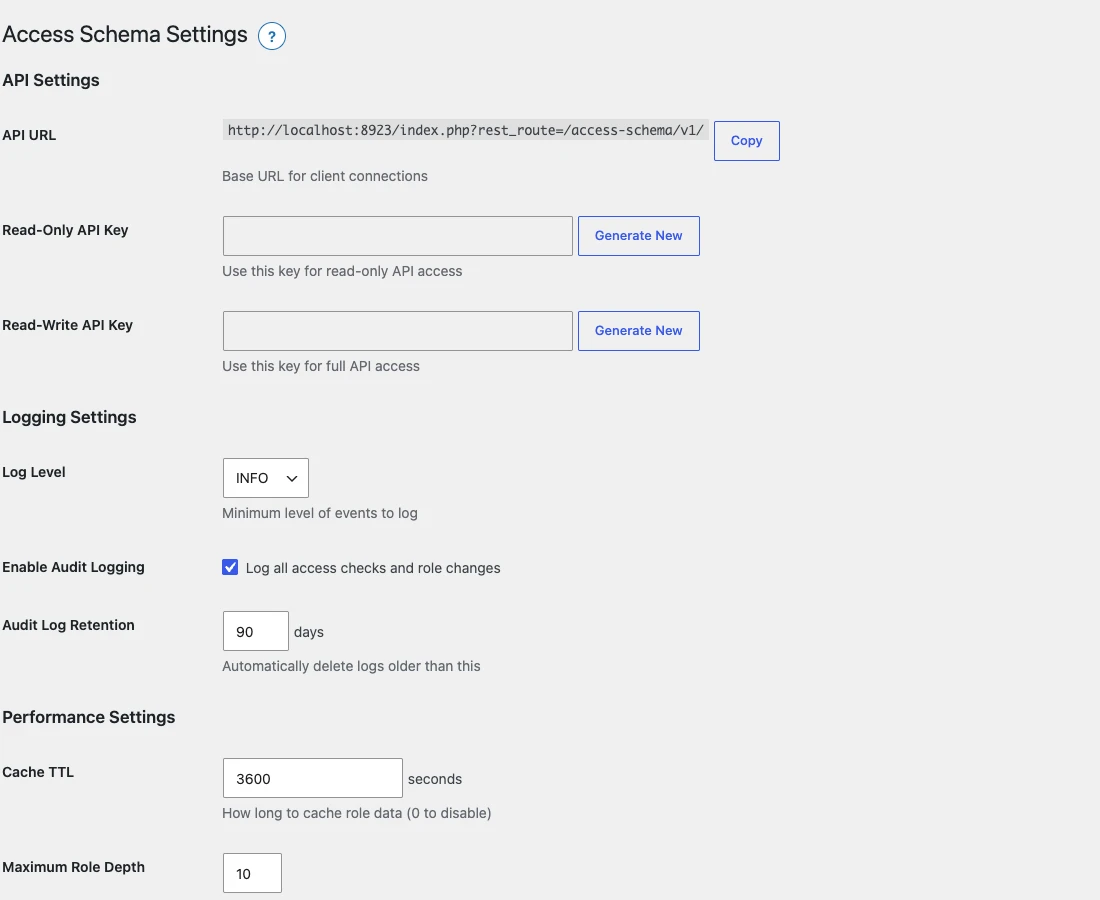
- API Settings
- API URL – the address other sites use, with Copy.
- Read-Only API Key – lets a site read roles.
- Read-Write API Key – lets a site give and take roles too.
- Generate New makes a new key.
- Logging Settings – Log Level, Enable Audit Logging (every role change and check), and Audit Log Retention in days.
- Performance Settings – Cache TTL in seconds, and Maximum Role Depth.
- Advanced Settings – Enable REST API, which other sites need, and Remove Data on Uninstall.
- Maintenance – Clear All Caches, Export Settings and Debug Information, with counts of roles, assignments and log entries.
Common tasks #
Connect another OWbN site #
- Click Copy next to API URL.
- Give that site's admin the URL and the right key: read-only if it only checks roles, read-write if it gives them, as C&C Manager does.
- They enter both in OWBN Core → Settings → accessSchema on their site.
Things to know #
- Generate New cuts off every site using the old key at once, until each has the new one. Change a key only when it has leaked.
- Leave Enable REST API on: without it no other site can check anyone's roles.
- Leave Remove Data on Uninstall off.
Troubleshooting #
- Other sites stopped seeing roles. Enable REST API is off, or a key was regenerated. Check both, and give the sites the current key.
- A role change doesn't show here. Click Clear All Caches.
