
Archivist Settings #
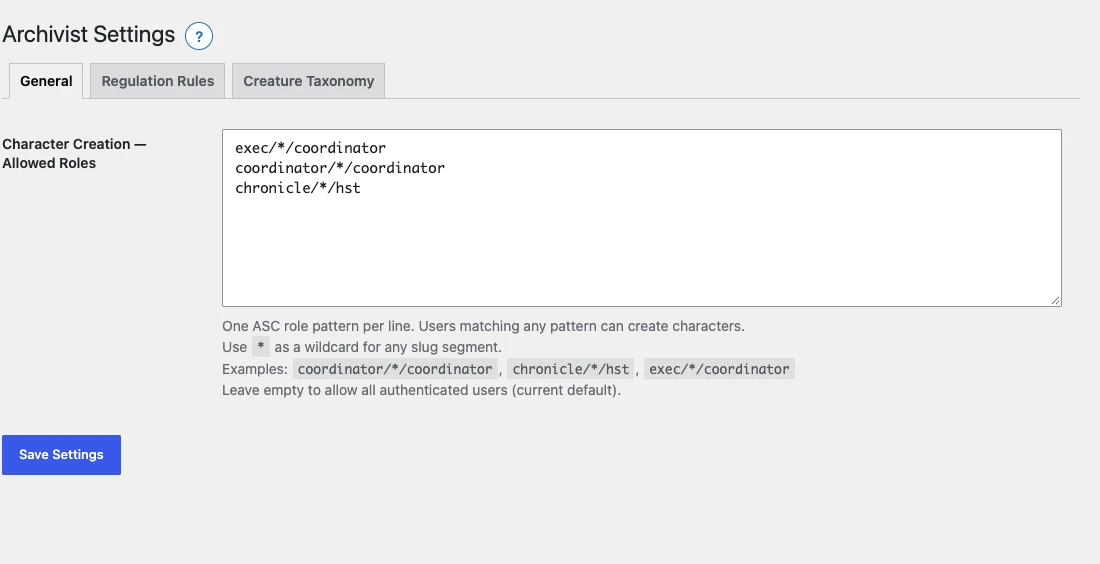
OAT's own settings on the Archivist site: who may create characters, the regulation rules, and the creature taxonomy.
Who can use this #
Accounts with the Archivist's access on the Archivist site.
How to get there #
On archivist.owbn.net, wp-admin → Archivist → Settings.
The screen #
Three tabs:
- General – Character Creation — Allowed Roles: one role pattern per line, with
*for any slug, such aschronicle/*/hst,coordinator/*/coordinatorandexec/*/coordinator. Anyone holding a matching role can create characters on Submit a Request; leave it empty to let everyone signed in create them. Players (a player/approved role, or a Player role in a chronicle) can always create their own PC, whatever the list says. Save Settings saves. - Regulation Rules – see Regulation Rules.
- Creature Taxonomy – see Creature Taxonomy.
Common tasks #
Let another role create characters #
- On General, add the role's pattern on its own line.
- Click Save Settings.
Things to know #
- Site admins can always create characters, whatever the list says. So can players, for their own PC.
- The list says who may create at all. Where: staff only in chronicles they're staff of, and a player only their own PC, in any chronicle, where that chronicle's HST approves it; Coordinators and the exec offices anywhere.
- Other OWbN sites read this list through the Archivist site and keep a copy for five minutes. If they can't reach it, nobody but site admins can create characters there until they can.
Troubleshooting #
- Someone with the role still can't create characters. Their roles reach OAT within about fifteen minutes, or when they sign in again.
