
Voting #
How CMs, coordinators and the others a vote names cast their ballot on council.owbn.net.
Who can use this #
Members whose roles a vote names under who can vote, such as every chronicle's CM. Signed in.
How to get there #
council.owbn.net → Voting Dashboard.
The screen #

- The open and scheduled votes you can see, with Title, Proposed By, Type (the proposal type, such as Budget), Start, End, Votes, Status and Result.
- Search and filter boxes above the list, and Show … per page.
- In Result: Vote on an open vote you can vote on; Update on one you've already voted on, if changing is allowed; Object on a consent agenda item; View for the rest.
- A scheduled vote shows when it opens.
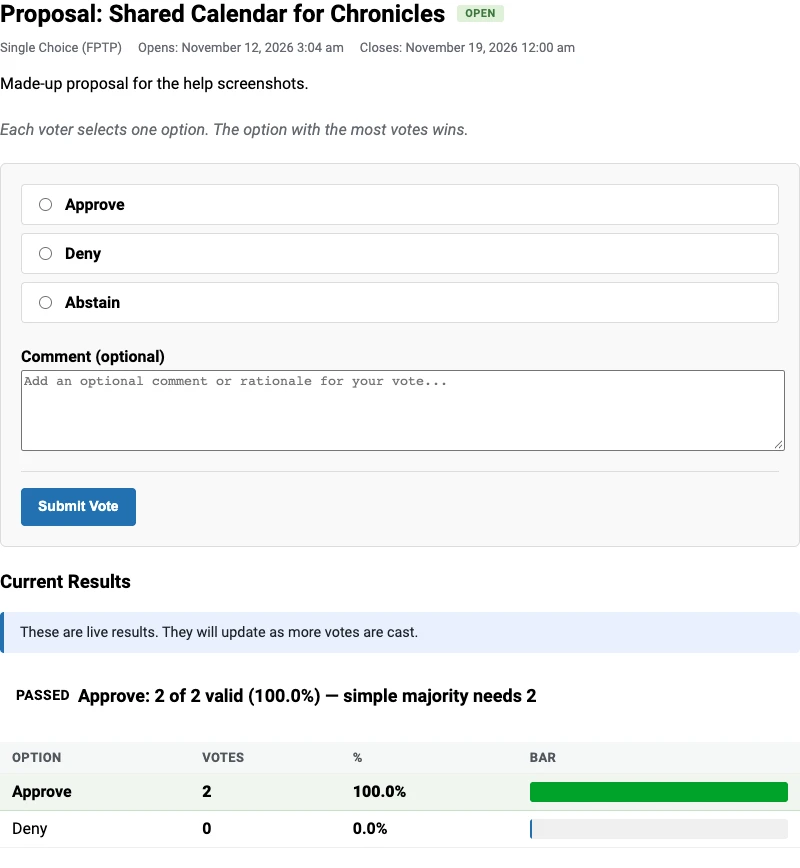
The ballot opens over the list:
- The options, as the vote's type asks: pick one, drag them into order (Move up and Move down do the same), pick a punishment level, or file an objection.
- You have multiple eligible roles. Select which role you are voting as – when more than one of your roles can vote, such as a CM who is also a coordinator. Your ballot counts for that chronicle or office.
- Comment (optional) – when the vote takes comments.
- Email me a confirmation of my vote – when the vote allows it, with the addresses to send it to.
- Submit Vote, Update Vote or File Objection.
Common tasks #
Vote #
- On the Voting Dashboard, click Vote next to the vote.
- Make your choice. On a ranked vote, drag your first choice to the top; you don't have to rank them all.
- If asked, pick the role you're voting as.
- Click Submit Vote.
Change your vote #
- Click Update next to the vote. Your earlier choice is filled in.
- Change it and click Update Vote.
This only works while the vote is open, and only if the vote allows changes.
Object to a consent agenda item #
- Click Object next to the item.
- Add a comment if you like, and click File Objection.
Your objection turns the item into a full Approve / Deny / Abstain vote straight away, open for a week. If you have no objection, do nothing: the item passes when its review ends.
Things to know #
- You cast one ballot per vote. Voting again, where changes are allowed, replaces it.
- Each chronicle or office has one ballot. If someone else already voted for your chronicle or office, your ballot replaces theirs: the latest one counts.
- Votes close on their closing date, and the count runs within the hour.
- On a vote with live results, you can watch the count while it's open.
Troubleshooting #
- No Vote button. The vote isn't open yet, you've already voted and changes aren't allowed, or none of your roles can vote on it.
- "You do not have permission to vote on this proposal." None of your roles is on the vote's list. If you were given the role recently, sign out and in again.
- "You must be logged in to vote." Sign in to council.owbn.net.
- A vote you expect isn't listed. It's restricted to roles you don't hold, or it's still a draft. Finished votes are on the Vote Results page.
